
TTF ->TMP 변환 / TextMeshPro _ Font Asset Creator
한글
| 범위 (16진수) | 문자 그룹 | 역할 |
|---|---|---|
0020 - 007E |
ASCII | 기본 영어, 숫자, 특수문자 |
AC00 - D7A3 |
한글 음절 | 가장 자주 사용되는 완성된 글자 (가, 나, 다...) |
3131 - 3163 |
한글 자모 | 채팅/입력창에서 사용되는 자음, 모음 (ㄱ, ㄴ, ㅏ, ㅑ...) |
1100 - 11FF |
한글 자모 확장 | 현대 한글 외의 옛 한글 자모 일부 |
32-126,44032-55203,12593-12634일본어
| 문자 그룹 | 10진수 범위 | 16진수 범위 | 포함되는 문자 |
|---|---|---|---|
| 영어 (ASCII) | 32 - 126 | 0020 - 007E |
기본 알파벳, 숫자, 특수문자 |
| 히라가나 | 12352 - 12447 | 3040 - 309F |
あいうえお, かきくけこ 등 |
| 가타카나 | 12448 - 12543 | 30A0 - 30FF |
アイウエオ, カキクケコ 등 |
| 간지 (CJK 통합) | 19968 - 40959 | 4E00 - 9FFF |
대부분의 한자 (약 2만 자) |
| 전각 문자 | 65280 - 65519 | FF00 - FFEF |
전각 숫자, 알파벳, 기호 |
32-126, 12352-12447, 12448-12543, 19968-40959, 65280-65519라틴 문자 및 키릴 문자 TMP
| 범위 (16진수) | 문자 그룹 | 역할 |
|---|---|---|
0020 - 007E |
ASCII | 영어, 숫자, 기본 특수문자 (모든 언어의 기본) |
00A0 - 00FF |
Latin-1 Supplement | 악센트가 있는 서유럽 문자 일부 (프랑스어, 독일어, 스페인어 등의 기본 확장) |
0100 - 017F |
Latin Extended-A | 중유럽어 및 베트남어의 주요 확장 라틴 문자 |
1E00 - 1EFF |
Latin Extended Additional | 베트남어 성조 부호 및 특수 부호 추가 |
0400 - 04FF |
Cyrillic | 러시아어를 포함한 키릴 문자 체계 |
32-126, 160-255, 256-383, 7680-7935, 1024-1279중국어 간체 (SC) TMP
| 범위 (16진수) | 문자 그룹 | 역할 |
|---|---|---|
0020 - 007E |
ASCII | 기본 영어, 숫자, 특수문자 (모든 언어의 기본) |
4E00 - 9FFF |
CJK 통합 한자 | 가장 자주 사용되는 간체 중국어 한자 및 공통 한자 (약 2만 자) |
3000 - 303F |
CJK 부호 및 구두점 | 중국어에서 사용하는 따옴표, 괄호 등 특수 구두점 |
20000 - 2A6DF |
CJK 통합 한자 확장 B | 자주 사용되지는 않으나 포괄적인 지원을 위해 포함할 수 있는 범위 (폰트 크기 매우 커짐 주의!) |
32-126, 160-255, 256-383, 7680-7935, 1024-1279태국어(Thai)
| 범위 (16진수) | 문자 그룹 | 역할 |
|---|---|---|
0020 - 007E |
ASCII | 기본 영어, 숫자, 특수문자 (모든 언어의 기본) |
0E00 - 0E7F |
Thai Script | 태국어 고유의 자음, 모음, 성조 부호 및 숫자 |
32-126, 3584-3711TTF ->TMP 변환하기
Version : Unity 2021.3.5f1
TTF 확장자 폰트는 유니티의 TextMeshPro에서 바로 사용할 수 없다. (또한 TMP 기본 폰트는 한글을 사용 할 수 없음)
일단 마음에 드는 무료 폰트를 받아 줍니다.
아래는 무료 글꼴 추천 사이트입니다.
https://gongu.copyright.or.kr/gongu/bbs/B0000018/list.do?menuNo=20000
https://www.kogl.or.kr/index.do
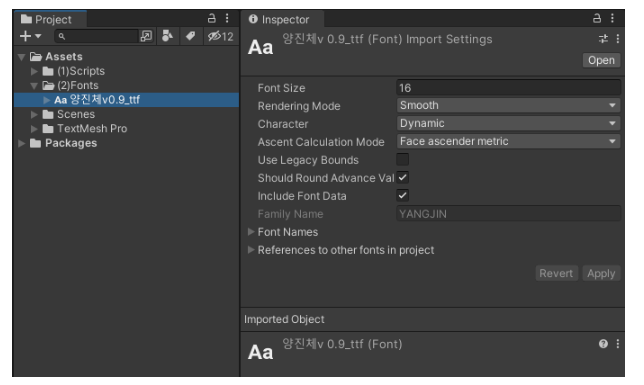
추가할 폰트 파일을 Assets 폴더에 넣어줍니다.
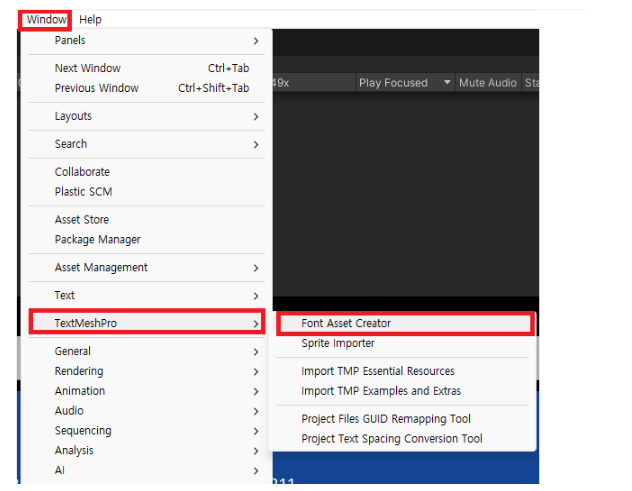
Windows -> TextMeshPro -> Font Asset Creator
Source Font File 에 폰트를 넣어줍니다.
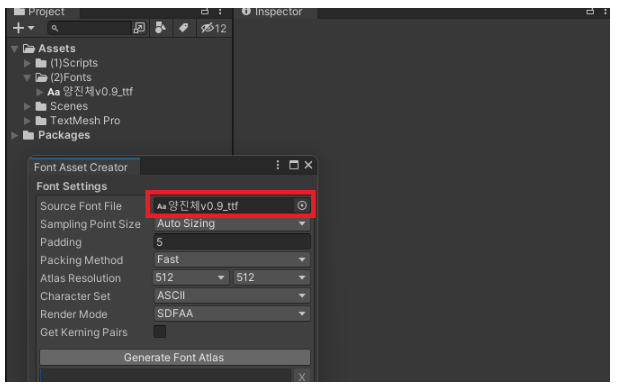
Auto Size 도 좋지만 각 내용을 봐야 할 것 같습니다.
Auto 는 편하지만 나중에 여러 문제가 생겼을 때 원인을 모르면 해결이 안되니까요.
아래는 공식 문서
https://docs.unity3d.com/Packages/[email protected]/manual/FontAssetsCreator.html
Font Asset Creator Settings:
| Property: | Function: | |
|---|---|---|
| Source Font File | Select a font from which to generate a Text Mesh Pro font Asset. This font is not included in project builds, unless you use it elsewhere in the project, or put it in a Resources folder. You can use one of the default TextMesh Pro font assets, or import your own. Text Mesh Pro 글꼴 자산을 생성할 글꼴을 선택합니다. | |
| Sampling Point Size | Set the font size, in points, used to generate the font texture. 글꼴 텍스처를 생성하는 데 사용되는 글꼴 크기를 포인트 단위로 설정합니다. | |
| Auto Sizing | Use the largest point size possible while still fitting all characters on the texture. This is the usual setting for SDF fonts. 텍스처의 모든 문자를 맞추면서 가능한 가장 큰 포인트 크기를 사용하십시오. 이것은 SDF 글꼴의 일반적인 설정입니다. | |
| Custom Size | Use a custom point size. Enter the desired size in the text box. Use this setting to achieve pixel-accurate control over bitmap-only fonts. 이 설정을 사용하여 비트맵 전용 글꼴을 픽셀 단위로 정확하게 제어합니다. | |
| Padding | Specify the space, in pixels, between characters in the font texture. Padding provides the space required to render character separately, and to generate the SDF gradient (See the documentation on Font Assets for details). The larger the padding, the smoother the transition, which allows for higher-quality rendering and larger effects, like thick outlines. A padding of 5 is often fine for a 512x512 texture. 글꼴 텍스처에서 문자 사이의 간격(픽셀)을 지정합니다. | |
| Packing Method | Specify how to fit the characters into the font texture. 문자를 글꼴 질감에 맞추는 방법을 지정합니다. | |
| Optimum | Finds the largest possible automatic font size that still fits all characters in the texture. Use this setting to generate the final font texture. 텍스처의 모든 문자에 맞는 가장 큰 자동 글꼴 크기를 찾습니다. | |
| Fast | Computes character packing more quickly, but may use a smaller font size than Optimum mode. Use this setting when testing out font Asset creation settings. 문자 패킹을 더 빠르게 계산하지만 Optimum 모드보다 작은 글꼴 크기를 사용할 수 있습니다. | |
| Atlas Resolution | Set the size width and height of the font texture, in pixels. A resolution of 512 x 512 is fine for most fonts, as long as you are only including ASCII characters. Fonts with more characters may require larger resolutions, or multiple atlases. When using an SDF font, a higher resolution produces finer gradients, and therefore higher quality text. 글꼴 텍스처의 크기 너비와 높이를 픽셀 단위로 설정합니다. | |
| Character Set | The characters in a font file aren't included in the font Asset automatically. You have to specify which ones you need. You can select a predefined character set, provide a list of characters to include, or include all of the characters in an existing font Asset or text Asset. 글꼴 파일의 문자는 글꼴 자산에 자동으로 포함되지 않습니다. | |
| ASCII | Includes the visible characters in the ASCII character set. | |
| Extended ASCII | Includes the visible characters in the extended ASCII character set. | |
| ASCII Lowercase | Includes only visible lower-case characters from the ASCII character set. | |
| ASCII Uppercase | Includes only visible upper-case characters from the ASCII character set. | |
| Numbers + Symbols | Includes only the visible numbers and symbols from the ASCII character set. | |
| Custom Range | Includes a range of characters that you define. Enter a sequence of decimal values, or ranges of values, to specify which characters to include. Use a hyphen to separate the first and last values of a range. Use commas to separate values and ranges (for example 32-126,160,8230). You can also choose an existing font Asset to include the characters in that Asset. |
|
| Unicode Range (Hex) | Includes a range of characters that you define. Enter a sequence of unicode hexadecimal values, or ranges of values, to specify which characters to include. Use a hyphen to separate the first and last values of a range. Use commas to separate values and ranges (for example 20-7E,A0,2026). You can also choose an existing font Asset to include the characters in that Asset. |
|
| Custom Characters | Includes a range of characters that you define. Enter a sequence of characters to specify which characters to include. Enter characters one after the other, with no spaces or delimiting characters in between (for example abc123*#%). You can also choose an existing font Asset to include the characters in that Asset. |
|
| Characters from File | Includes all the characters in a text Asset that you specify. Use this option when you want to save your character set. | |
| Font Style | Apply basic font styling when creating a bitmap-only font Asset. For SDF fonts, you configure the styling in the shader rather than the font Asset. 비트맵 전용 글꼴 에셋을 만들 때 기본 글꼴 스타일을 적용합니다. | |
| Normal | Generates characters with no styling. 스타일 지정 없이 문자를 생성합니다. | |
| Bold, Italic, Bold_Italic | Generates the font Asset with bold characters, italicized characters, or both. With these settings, you can set a strength value that applied to bolding and italicization 볼드체, 이탤릭체 또는 둘 다를 사용하여 글꼴 자산을 생성합니다. | |
| Outline | Generates the font Asset with outline characters. 아웃라인 문자로 글꼴 자산을 생성합니다. | |
| Bold_Sim | Generates the font Asset with ???? | |
| Render Mode | Specify the render mode to use when outputting the font atlas. 글꼴 아틀라스를 출력할 때 사용할 렌더링 모드를 지정합니다. | |
| SMOOTH | Renders the atlas to an antialiased bitmap. | |
| RASTER | Renders the atlas to a non-antialiased bitmap. | |
| SMOOTH_HINTED | Renders the atlas to an antialiased bitmap, and aligns character pixels with texture pixels for a crisper result. | |
| RASTER_HINTED | Renders the atlas to a non-antialiased bitmap and aligns character pixels with texture pixels for a crisper result. | |
| SDF | Renders the atlas using a slower, but more accurate SDF generation mode, and no oversampling. | |
| SDFAA | Renders the atlas using a faster, but less accurate SDF generation mode. It produces font atlases that are sufficient for most situations. | |
| SDFAA_HINTED | Renders the atlas using a faster, but less accurate SDF generation mode, and aligns character pixels with texture pixels for a crisper result.. It produces font atlases that are sufficient for most situations | |
| SDF8 | Renders the atlas using a slower, but more accurate SDF generation mode, and 8x oversampling. | |
| SDF16 | Renders the atlas using a slower, but more accurate SDF generation mode, and 16x oversampling. | |
| SDF32 | Renders the atlas using a slower, but more accurate SDF generation mode, and 32x oversampling. Use this setting for fonts with complex or small characters. | |
| Get Kerning Pairs | Enable this option to copy the kerning data from the font. Kerning data is used to adjust the spacing between specific character pairs to produce a more visually pleasing result. Note: It isn't always possible to import kerning data. Some fonts store kerning pairs in their glyph positioning (GPOS) table, which is not supported by FreeType, the font engine used by TextMesh Pro. Other fonts do not store kerning pairs at all. 글꼴에서 커닝 데이터를 복사하려면 이 옵션을 활성화합니다. 커닝 데이터는 특정 문자 쌍 사이의 간격을 조정하여 보다 시각적으로 만족스러운 결과를 생성하는 데 사용됩니다. | |
| Generate Font Atlas | Generate the font atlas texture. 글꼴 아틀라스 텍스처를 생성합니다. | |
| Save | Save the current font atlas. 현재 글꼴 아틀라스를 저장합니다. | |
| Save As | Save the current font atlas as a new font Asset. 현재 글꼴 아틀라스를 새 글꼴 자산으로 저장합니다. |
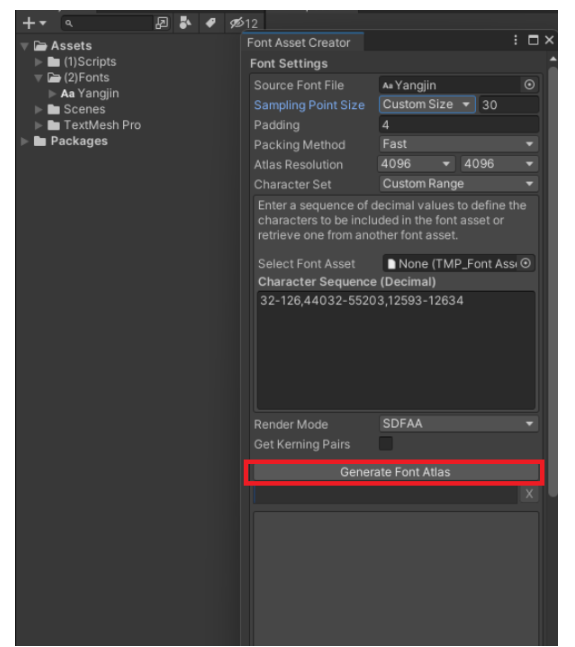
일반적인 한글 TMP 생성 설정
Sampling Point Size : Custom Size / 30
Padding : 4
Packing Method : Fast
Atlas Resolution : 4096 / 4096
Character Set : Custom Range
Character Sequence(Decimal) : 32-126[영어], 44032-55203[한글], 12593-12634[한글자모 2]
32-126,44032-55203,12593-12634파일명이 한글이면 오류난다... 주의!
Generate Font Atlas 를 눌러주고 완료되면 Save 해주자
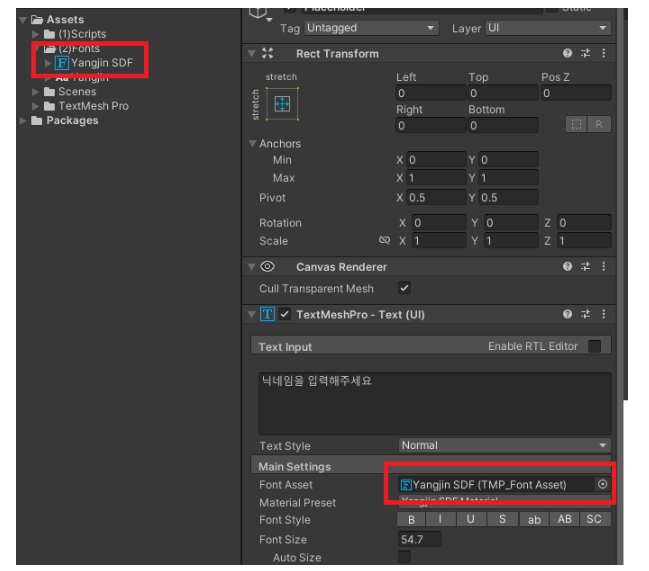

완료!
- Yangjin-SDF 1.5 MB